Call Reports
Call Reports is where Caramel keeps a searchable log of your phone calls. These call records can be received by Caramel through your phone system integration (for example via VoIP or Caller ID), so your operators can review call activity directly inside the app.
Incoming and outgoing calls also appear live as small pop-up notifications in the side menu. When a call ends, the pop-up automatically disappears — and the same call is saved into Call Reports.
If the phone number already exists in your Customers or Vendors list, Caramel shows the contact name. Otherwise, you’ll see the phone number itself (for unknown callers).
- Go to Customers & Vendors to manage contacts and make sure caller names show correctly.
- If you don’t have a contact yet, you can create one directly from Call Reports (explained below).
What you can see in the table
The Call Reports table includes these columns:
- Name
- Phone
- Line
- Type
- Status
- Duration
- Start
- Answer
- End
You can sort the list by clicking on any column header.
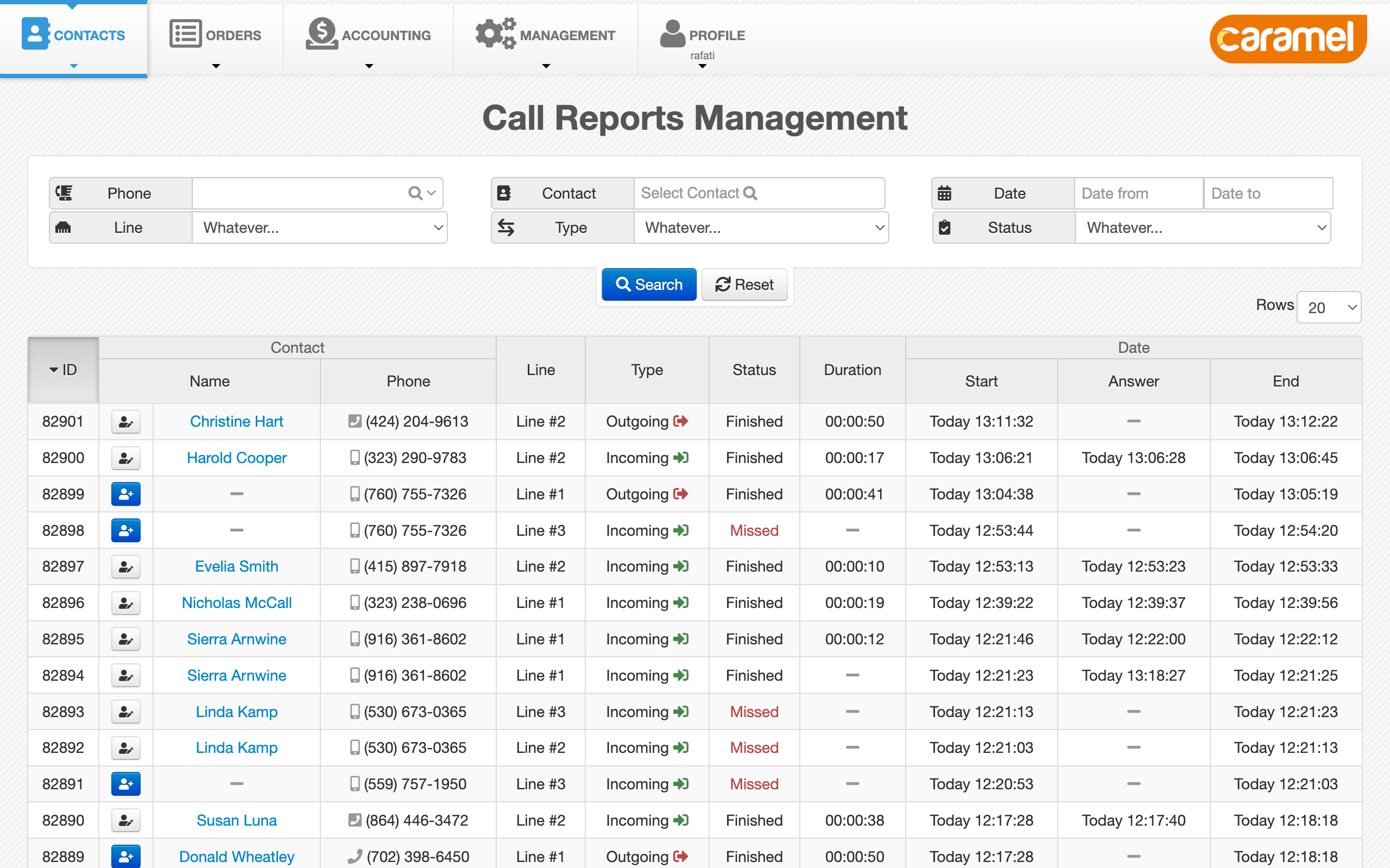
Search and filters
At the top of the table, you’ll find a filter box. Use it to narrow down results based on the same table columns.
Common examples:
- Search by phone number (full number or a partial match).
- Filter calls within a specific date/time range.
- Filter by call status (for example: missed calls).
- Filter by call type (incoming or outgoing).
If you often receive calls from the same contacts, make sure those numbers are saved under Customers or Vendors so the Name column becomes more useful.
Creating or editing contacts from Call Reports
For each row, Caramel shows a contact action on the left:
- If the number is not saved in Customers/Vendors (unknown caller), you’ll see a small blue button with a new contact icon — use it to quickly create a new contact.
- If the number is already saved, you’ll see the regular edit contact button — use it to open and update the existing contact.
If the caller is hidden/unknown and no matching contact exists, Caramel can only show what it receives (usually the number). In that case, creating a contact may require you to collect the caller details manually.